Meetings

Host HD video meetings with AI-powered transcription, real-time translation, and automatic meeting minutes generation.

OrgsLedger meetings are designed for modern cross-border organizations. Every meeting includes:

📹

HD Video

Crystal-clear video up to 1080p with adaptive quality

🎤

HD Audio

Noise-cancelling audio with echo suppression

📝

Transcription

Real-time speech-to-text with speaker ID

🌍

Translation

Live translation in 50+ languages

📋

AI Minutes

Automatic meeting summaries with action items

💾

Recording

Record meetings for later review

OrgsLedger's AI enhances every meeting with intelligent features that save time and improve collaboration.

Live Transcription

Every word is captured in real-time with:

  • Speaker identification: Know who said what
  • Keyword highlighting: Important terms are automatically emphasized
  • Timestamp sync: Click any text to jump to that moment in the recording
  • Export options: Download as PDF, Word, or plain text
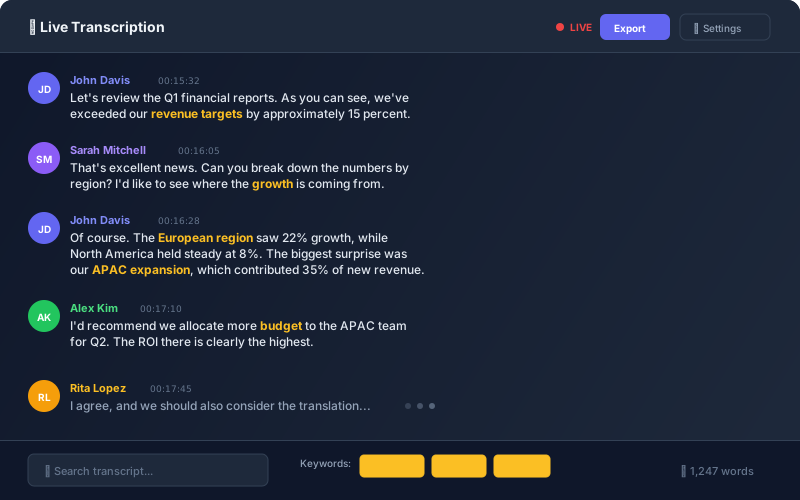
OrgsLedger Live Transcription

AI Meeting Minutes

After your meeting ends, OrgsLedger's AI analyzes the transcript and generates professional meeting minutes including:

  • Executive summary: A concise overview of the meeting
  • Key decisions: All decisions made during the meeting
  • Action items: Tasks with assignees and due dates
  • Discussion topics: Summary of each agenda item
  • Attendance: Who was present and for how long
💡
AI Minutes Usage

AI minutes use your plan's included AI hours. A typical 1-hour meeting uses approximately 5-10 minutes of AI time for processing.

Real-Time Translation

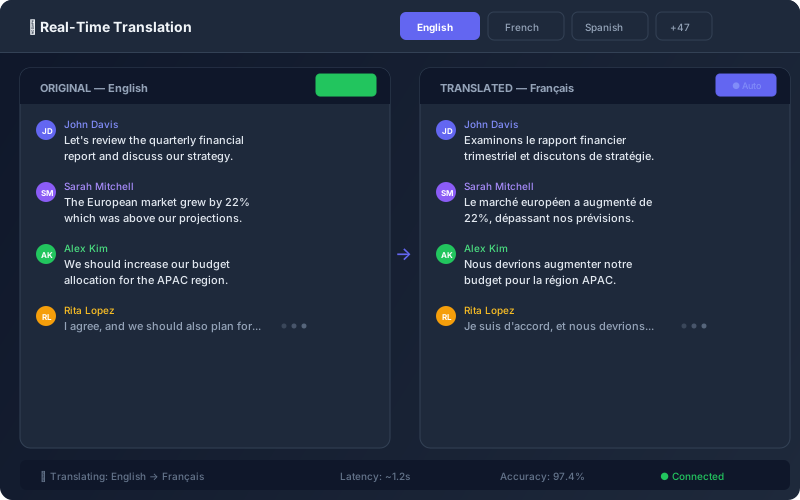
Break language barriers with live translation. Each participant can:

  • Set their preferred language in their profile
  • See live subtitles in their chosen language
  • Read the transcript in their language
  • Receive translated meeting minutes
OrgsLedger Real-Time Translation

OrgsLedger automatically adjusts video quality based on your network conditions:

QualityResolutionBandwidth
HD1080p3+ Mbps
Standard720p1.5 Mbps
Low480p500 Kbps
Audio Only100 Kbps
Network Optimization

Our system prioritizes speaker video and audio quality, ensuring the active speaker is always clear even on slower connections.

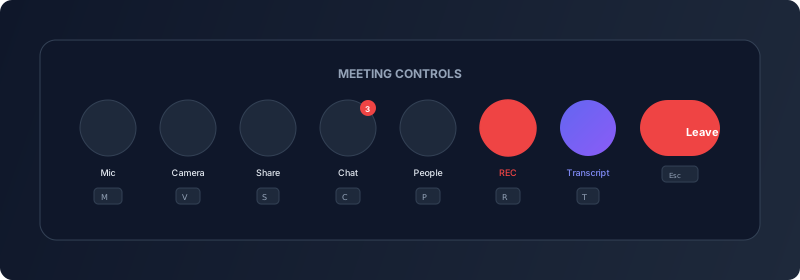
During a meeting, you have access to the following controls:

OrgsLedger Meeting Controls

Primary Controls

ControlDescriptionShortcut
🎤 MicrophoneToggle microphone on/offM
📹 CameraToggle camera on/offV
🖥️ Screen ShareShare your screen or appS
💬 ChatOpen/close chat panelC
👥 ParticipantsView participant listP
🔴 RecordStart/stop recordingR
📝 TranscriptShow/hide live transcriptT
🚪 LeaveLeave or end meetingEsc

Host Controls

As a meeting host, you have additional controls:

  • Mute all: Mute all participants at once
  • Lock meeting: Prevent new participants from joining
  • Remove participant: Remove a participant from the meeting
  • Assign co-host: Give another participant host privileges
  • End for all: End the meeting for everyone

Before the Meeting

  • ✅ Test your audio and video before joining
  • ✅ Use a stable internet connection (wired preferred)
  • ✅ Find a quiet location with good lighting
  • ✅ Share the agenda with attendees in advance

During the Meeting

  • ✅ Mute when not speaking to reduce background noise
  • ✅ Speak clearly for better transcription accuracy
  • ✅ Use "raise hand" feature to request speaking time
  • ✅ Check the chat periodically for questions

After the Meeting

  • ✅ Review AI-generated minutes within 24 hours
  • ✅ Edit and approve minutes before sharing
  • ✅ Assign action items to specific members
  • ✅ Share recording and transcript with absent members
⚠️
Transcription Accuracy

While our AI is highly accurate, always review transcripts and minutes before sharing. Technical terms, names, and accents may occasionally need correction.